Understanding TLS Certificates: A Complete Beginner’s Guide
A few days ago, I deployed my first tiny backend app — an Express server running on a VPS. It worked. It responded. It made me feel like a hero.
On this page
TLS Certificates Explained: How HTTPS Establishes Trust🤔 Why do we even need TLS?🔐 The first idea: Symmetric Encryption🔑 Public-Key Encryption saves the day❗New problem: TrustTLS Certificates & Certificate Authorities (CA)🔎 What’s inside that digital signature?🧊 Quick Story Example🔥 Why Backend Engineers Should Care🏁 Final TakeawayTLS Certificates Explained: How HTTPS Establishes Trust
A few days ago, I deployed my first tiny backend app — an Express server running on a VPS. It worked. It responded. It made me feel like a hero. Until the browser greeted me with the bright, judgmental message:
“ ⚠️ Your connection is not secure.” Not exactly the confidence boost I expected.
At that moment, TLS certificates felt like magic spells you somehow install, and suddenly the browser stops yelling. I didn’t really know why it fixes things — I only knew that HTTPS = secure and HTTP.
If you can relate this, sit tight. In this guide, we’ll unwrap TLS certificates like a story — what they are, why they exist, how they work under the hood.
🤔 Why do we even need TLS?
Every HTTP request travels across public networks. Routers, proxies, ISPs anyone in the middle can inspect raw packets. If you’re sending sensitive data like login credentials over plain HTTP, it becomes incredibly easy for attackers to read or steal it.
Client → "password123" → 🕵 MITM → ServeraWe need a way to make those packets unreadable to anyone except the intended recipient. Encryption is the answer.
🔐 The first idea: Symmetric Encryption
Symmetric encryption is simple:
One key encrypts the data, the same key decrypts it.
Fast. Efficient. Used heavily once connection is established. But there’s a catch both sides need to share the same key first. If we just send the key over the internet, a hacker could intercept it.
It’s like locking your home with a padlock, but sending the key by mail through a stranger. Risky.
This leads us to the second tool.
🔑 Public-Key Encryption saves the day
Here’s the trick:
- Server generates two keys:
- Public Key → can be shared openly
- Private Key → must stay secret
Anything encrypted with the public key can only be decrypted by the private key.
So the browser says:
“Hey server, send me your public key.”
It receives it and sends back a newly generated symmetric key, encrypted using that public key. Only the server can unlock it.
Boom, secure symmetric key exchange.
Now both have the same key, and the conversation can switch to fast symmetric encryption.
So far so good… right?
Not quite.
❗New problem: Trust
What if a hacker sits in the middle and sends their own public key pretending to be the server?
Browser: “Hello example.com, send your public key.”
Attacker: “Here you go!” (sends fake key)
Now the browser happily encrypts the symmetric key and hands it over to the attacker. They decrypt everything, read the data, encrypt again, and forward to server. Both sides think they’re talking privately but they’re not.
Classic Man-in-the-Middle (MITM) attack.
So the browser needs a way to confirm:
“Is this public key really from example.com, or from an imposter?”
This is where TLS Certificates used.
TLS Certificates & Certificate Authorities (CA)
Think of a TLS certificate as a passport for websites. A digital ID that says:
“Yes, this server is who it says it is.”
But who issued this passport?
Certificate Authorities (CAs) — trusted organizations like:
- Let’s Encrypt (free)
- DigiCert
- GlobalSign
Browsers already trust them (their public keys are pre-installed in your OS/browser).
When a server wants a certificate, it sends its public key + domain info to a CA. The CA verifies ownership, then issues a certificate containing:
- Server public key
- Domain name
- Validity period
- CA details
- Digital signature
This signature is the important part. It’s the stamp that proves:
“This certificate was verified and signed by a trusted CA.”
🔎 What’s inside that digital signature?
Without going too cryptographic -> here’s the idea:
- CA takes certificate data (public key, domain, expiry…)
- Creates a hash of it
- Encrypts that hash using CA’s private key
- That encrypted hash becomes the digital signature
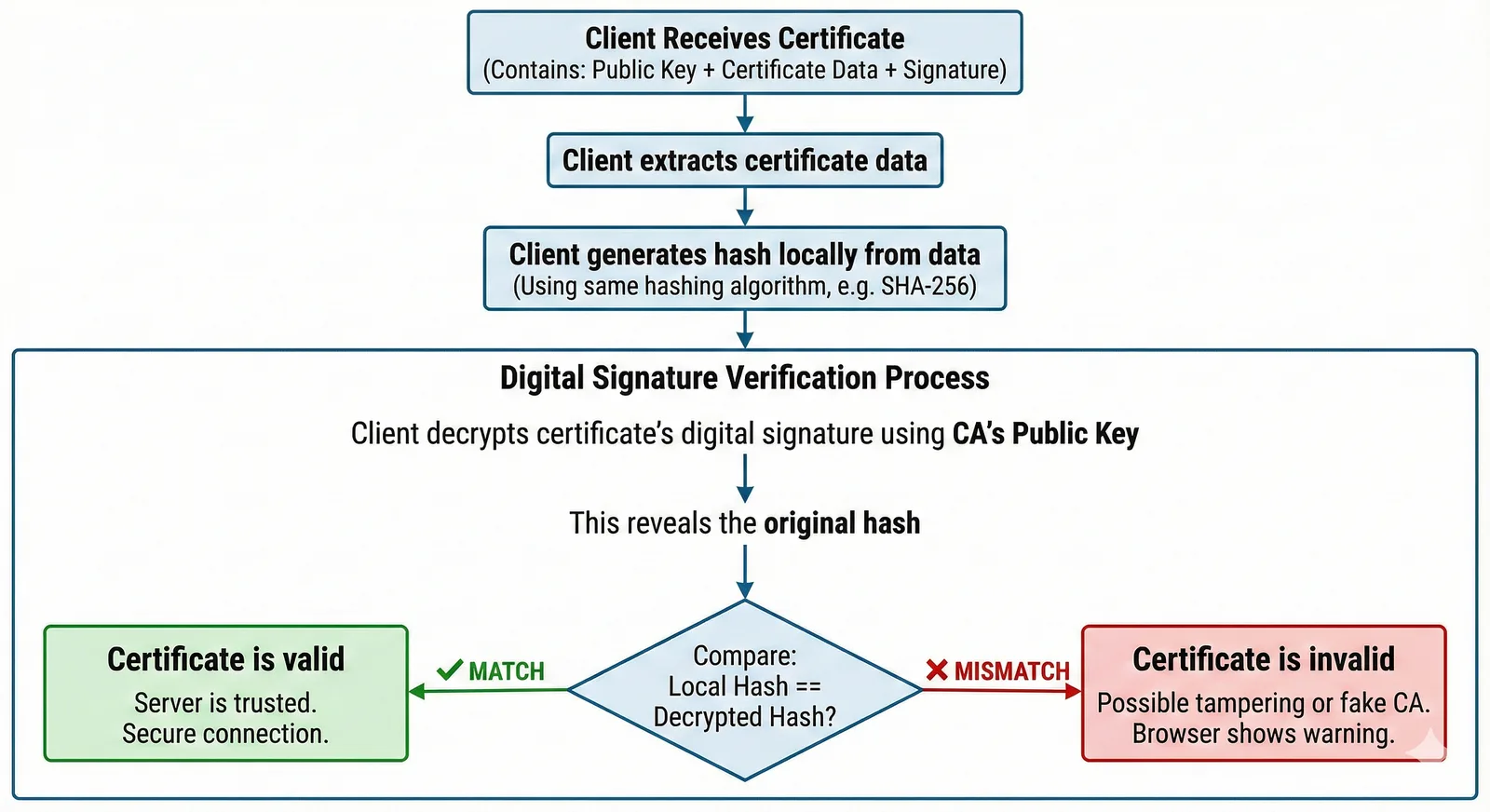
When a browser receives the certificate:
- It reads the certificate data and hashes it
- It decrypts the signature using CA’s public key
- If both hashes match → certificate is legit If not → 🚨 warning page
IF hashFromClient == hashFromCA
    Trust the certificate
ELSE
    Something’s fishy — warn user
That’s it. The browser now knows:
✔ The server is real ✔ Public key wasn’t modified ✔ Safe to share symmetric key
After that, both sides switch to fast symmetric encryption, and your data flows privately.
🧊 Quick Story Example
Imagine you’re meeting someone through OLX to buy a used laptop.
You don’t fully trust them yet, so you ask for some identity proof maybe a driving licence or PAN card.
You don’t know the seller personally, but you trust the authority that issued the ID (like RTO or Income Tax Dept).
That official ID convinces you the person is legit, so you’re comfortable completing the deal.
That’s exactly what HTTPS does — just with more encryption and fewer OLX negotiations.
🔥 Why Backend Engineers Should Care
As a backend dev, you’ll need certificates when:
- Deploying apps on VPS or cloud
- Handling API traffic securely
- Using domains with HTTPS
- Setting up Nginx, reverse proxies, load balancers
- Working with microservices & mTLS
You’ll come across terms like:
- PEM, CRT, KEY files
- Self-signed certs
- Certificate chain
- Renewal & automation (Certbot)
- TLS versions & ciphers
Understanding the foundation makes all these things feel less mystical.
🏁 Final Takeaway
TLS certificates aren’t just paperwork for HTTPS — they solve a real internet trust problem.
Here’s the whole story in one go
- HTTP sends data in plain text → insecure
- We encrypt, but need key exchange → symmetric key issue
- Public-key crypto allows safe exchange
- But trust is needed → MITM vulnerability
- TLS certificates + CA solve identity verification
- Browser validates signature → trusts server
- Secure symmetric communication begins 🎉
Next time the lock 🔒 appears in the browser, you’ll know there’s a whole handshake and trust chain working behind it.